Shall we notify you when we find a match?

Stay informed even while you're in the game: match ready, room link, result.

On iPhone, alerts only work with CashBrawl on your Home screen: it takes a minute.

Alerts are blocked. You can still search: keep this page open. To turn them back on, use your browser settings.

Without alerts, keep this page open: if you don't join in time, the No-Show penalty applies.

Add CashBrawl to your Home screen

On iPhone, alerts only work with CashBrawl on your Home screen: it takes a minute.

From your Home screen you play full screen and alerts arrive even with the site closed.

This browser can't receive alerts: open CashBrawl in Chrome or Safari.

First open this page in Safari: tap ⋯ and choose “Open in Safari”.

First open this page in Chrome: tap ⋮ and choose “Open in Chrome”.

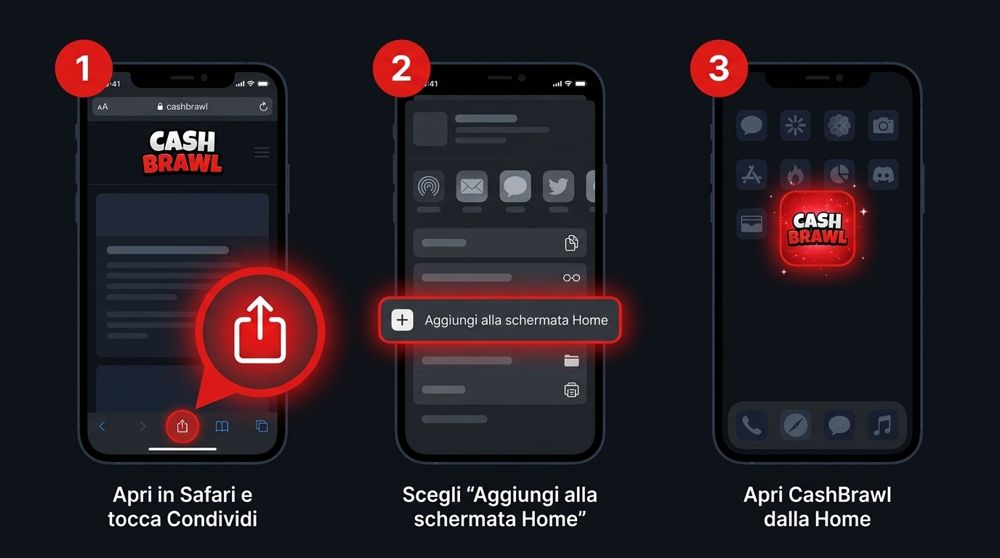
1Open app.cashbrawl.app in Safari and tap Share (the icon with the up arrow)
2Choose "Add to Home Screen" and confirm
3Open CashBrawl from your Home screen
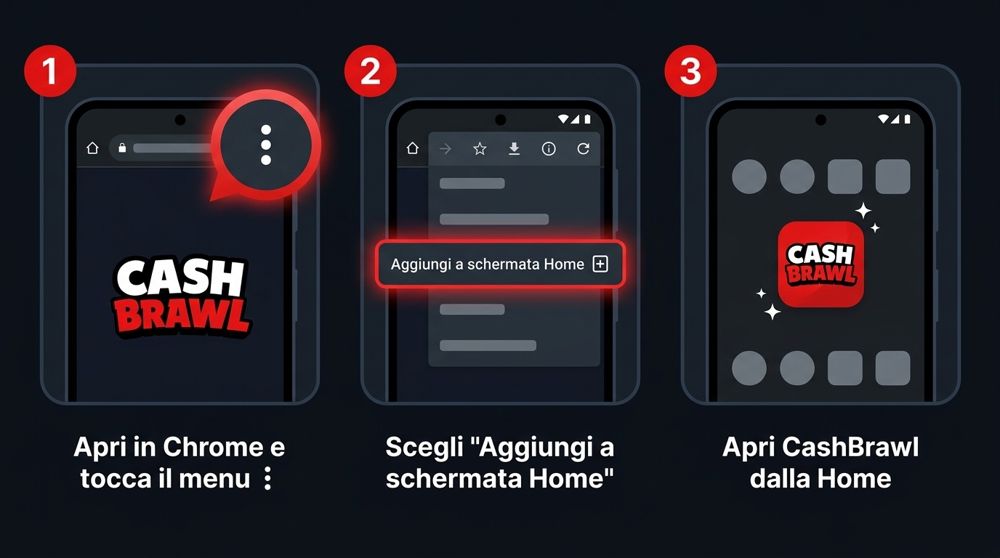
1Open app.cashbrawl.app in Chrome and tap the ⋮ menu in the top right
2Choose "Add to Home screen" and confirm
3Open CashBrawl from your Home screen
CashBrawl

Create your account

Please try again in a few minutes.

We can't verify this sign-in. Close CashBrawl and reopen it from the bot.

This session belongs to another account. Close CashBrawl and reopen it from the correct Telegram account.

CashBrawl can't open in this client. Use an up-to-date version of the official Telegram app.

We can't verify the outcome yet. Refresh the page to check before repeating the action.

Not affiliated with Supercell · Play responsibly · 18+
PrivacyTerms and ConditionsGame RulesResponsible Gaming